Loading...
Explore One Call API® endpoint version 4.0
We recommend using the One Call API, endpoint version 4.0, for all new integrations. It provides access to our latest weather data, enhanced functionality, and new features such as high-resolution 15-minute forecasts, extended weather timelines, and a unified API structure for historical and forecast data.
Please review the One Call API, endpoint version 4.0 documentation and our Migration guide.
One Call API, endpoint version 3.0
Product concept
Getting essential weather data, short-term and long-term forecasts, and aggregated weather data is easy with our OpenWeather One Call API, endpoint version 3.0.
One Call API, endpoint version 3.0, contains 5 endpoints and provides access to various data:
- Current weather and forecasts: and government weather alerts
- 1-minute forecast for 1 hour
- hourly forecast for 48 hours
- daily forecast for 8 days
- Weather data for any timestamp for 47+ years historical archive and 4 days ahead forecast
- Daily aggregation of weather data for 47+ years archive and 1.5 years ahead forecast
- Weather overview with a human-readable weather summary for today and tomorrow's forecast, utilizing OpenWeather AI technologies
- AI Weather Assistant for retrieving weather data and weather-related advice in a human-readable and friendly format.
One Call API, endpoint version 3.0, is based on the proprietary OpenWeather Model and is updated every 10 minutes. Thus, to receive the most accurate and up-to-date weather data, we recommend that you request the One Call API, endpoint version 3.0 every 10 minutes.
Please note that One Call API, endpoint version 3.0, is included in the "One Call API" subscription only. This separate subscription includes 1,000 calls/day for free and allows you to pay only for the number of API calls made to this product.
Current and forecasts weather data
To get access to current weather, a minute forecast for 1 hour, an hourly forecast for 48 hours, a daily forecast for 8 days and government weather alerts, please use this section of the documentation.
If you are interested in other functionality in the One Call API, endpoint version 3.0, please check the Product concept to find the right section.
How to make an API call
API call
https://api.openweathermap.org/data/3.0/onecall?lat={lat}&lon={lon}&exclude={part}&appid={API key}Parameters | ||
|---|---|---|
| required | Latitude, decimal (-90; 90). If you need the geocoder to automatic convert city names and zip-codes to geo coordinates and the other way around, please use our Geocoding API |
| required | Longitude, decimal (-180; 180). If you need the geocoder to automatic convert city names and zip-codes to geo coordinates and the other way around, please use our Geocoding API |
| required | Your unique API key (you can always find it on your account page under the "API key" tab) |
| optional | By using this parameter you can exclude some parts of the weather data from the API response. It should be a comma-delimited list (without spaces). Available values: |
| optional | Units of measurement. |
| optional | You can use the |
Example of API call
Before making an API call, please note that the One Call API, endpoint version 3.0, is included in the "One Call API" subscription only. Learn more
If you want to exclude some parts of the weather data from the API response, please add the exclude parameter to the API call, as in the example below:
Example of API call
https://api.openweathermap.org/data/3.0/onecall?lat=33.44&lon=-94.04&exclude=hourly,daily&appid={API key}If you do not need to exclude any of the weather data from the API response please use API call like in the example below:
Example of API call
https://api.openweathermap.org/data/3.0/onecall?lat=33.44&lon=-94.04&appid={API key}Example of API response
To view the API response, expand the example by clicking the triangle.Fields in API response
If you do not see some of the parameters in your API response it means that these weather phenomena are just not happened for the time of measurement for the city or location chosen. Only really measured or calculated data is displayed in API response.
latLatitude of the location, decimal (−90; 90)lonLongitude of the location, decimal (-180; 180)timezoneTimezone name for the requested locationtimezone_offsetShift in seconds from UTCcurrentCurrent weather data API responsecurrent.dtCurrent time, Unix, UTCcurrent.sunriseSunrise time, Unix, UTC. For polar areas in midnight sun and polar night periods this parameter is not returned in the responsecurrent.sunsetSunset time, Unix, UTC. For polar areas in midnight sun and polar night periods this parameter is not returned in the responsecurrent.tempTemperature. Units - default: kelvin, metric: Celsius, imperial: Fahrenheit. How to change units usedcurrent.feels_likeTemperature. This temperature parameter accounts for the human perception of weather. Units – default: kelvin, metric: Celsius, imperial: Fahrenheit.current.pressureAtmospheric pressure on the sea level, hPacurrent.humidityHumidity, %current.dew_pointAtmospheric temperature (varying according to pressure and humidity) below which water droplets begin to condense and dew can form. Units – default: kelvin, metric: Celsius, imperial: Fahrenheitcurrent.cloudsCloudiness, %current.uviCurrent UV index.current.visibilityAverage visibility, metres. The maximum value of the visibility is 10 kmcurrent.wind_speedWind speed. Wind speed. Units – default: metre/sec, metric: metre/sec, imperial: miles/hour. How to change units usedcurrent.wind_gust(where available) Wind gust. Units – default: metre/sec, metric: metre/sec, imperial: miles/hour. How to change units usedcurrent.wind_degWind direction, degrees (meteorological)current.raincurrent.rain.1h(where available) Precipitation, mm/h. Please note that only mm/h as units of measurement are available for this parameter
current.snowcurrent.snow.1h(where available) Precipitation, mm/h. Please note that only mm/h as units of measurement are available for this parameter
current.weathercurrent.weather.idWeather condition idcurrent.weather.mainGroup of weather parameters (Rain, Snow etc.)current.weather.descriptionWeather condition within the group (full list of weather conditions). Get the output in your languagecurrent.weather.iconWeather icon id. How to get icons
minutelyMinute forecast weather data API responseminutely.dtTime of the forecasted data, unix, UTCminutely.precipitationPrecipitation, mm/h. Please note that only mm/h as units of measurement are available for this parameter
hourlyHourly forecast weather data API responsehourly.dtTime of the forecasted data, Unix, UTChourly.tempTemperature. Units – default: kelvin, metric: Celsius, imperial: Fahrenheit. How to change units usedhourly.feels_likeTemperature. This accounts for the human perception of weather. Units – default: kelvin, metric: Celsius, imperial: Fahrenheit.hourly.pressureAtmospheric pressure on the sea level, hPahourly.humidityHumidity, %hourly.dew_pointAtmospheric temperature (varying according to pressure and humidity) below which water droplets begin to condense and dew can form. Units – default: kelvin, metric: Celsius, imperial: Fahrenheit.hourly.uviUV indexhourly.cloudsCloudiness, %hourly.visibilityAverage visibility, metres. The maximum value of the visibility is 10 kmhourly.wind_speedWind speed. Units – default: metre/sec, metric: metre/sec, imperial: miles/hour.How to change units usedhourly.wind_gust(where available) Wind gust. Units – default: metre/sec, metric: metre/sec, imperial: miles/hour. How to change units usedhourly.wind_degWind direction, degrees (meteorological)hourly.popProbability of precipitation. The values of the parameter vary between 0 and 1, where 0 is equal to 0%, 1 is equal to 100%hourly.rainhourly.rain.1h(where available) Precipitation, mm/h. Please note that only mm/h as units of measurement are available for this parameter
hourly.snowhourly.snow.1h(where available) Precipitation, mm/h. Please note that only mm/h as units of measurement are available for this parameter
hourly.weatherhourly.weather.idWeather condition idhourly.weather.mainGroup of weather parameters (Rain, Snow etc.)hourly.weather.descriptionWeather condition within the group (full list of weather conditions). Get the output in your languagehourly.weather.iconWeather icon id. How to get icons
dailyDaily forecast weather data API responsedaily.dtTime of the forecasted data, Unix, UTCdaily.sunriseSunrise time, Unix, UTC. For polar areas in midnight sun and polar night periods this parameter is not returned in the responsedaily.sunsetSunset time, Unix, UTC. For polar areas in midnight sun and polar night periods this parameter is not returned in the responsedaily.moonriseThe time of when the moon rises for this day, Unix, UTCdaily.moonsetThe time of when the moon sets for this day, Unix, UTCdaily.moon_phaseMoon phase.0and1are 'new moon',0.25is 'first quarter moon',0.5is 'full moon' and0.75is 'last quarter moon'. The periods in between are called 'waxing crescent', 'waxing gibbous', 'waning gibbous', and 'waning crescent', respectively. Moon phase calculation algorithm: if the moon phase values between the start of the day and the end of the day have a round value (0, 0.25, 0.5, 0.75, 1.0), then this round value is taken, otherwise the average of moon phases for the start of the day and the end of the day is takensummaryHuman-readable description of the weather conditions for the daydaily.tempUnits – default: kelvin, metric: Celsius, imperial: Fahrenheit. How to change units useddaily.temp.mornMorning temperature.daily.temp.dayDay temperature.daily.temp.eveEvening temperature.daily.temp.nightNight temperature.daily.temp.minMin daily temperature.daily.temp.maxMax daily temperature.
daily.feels_likeThis accounts for the human perception of weather. Units – default: kelvin, metric: Celsius, imperial: Fahrenheit. How to change units useddaily.feels_like.mornMorning temperature.daily.feels_like.dayDay temperature.daily.feels_like.eveEvening temperature.daily.feels_like.nightNight temperature.
daily.pressureAtmospheric pressure on the sea level, hPadaily.humidityHumidity, %daily.dew_pointAtmospheric temperature (varying according to pressure and humidity) below which water droplets begin to condense and dew can form. Units – default: kelvin, metric: Celsius, imperial: Fahrenheit.daily.wind_speedWind speed. Units – default: metre/sec, metric: metre/sec, imperial: miles/hour. How to change units useddaily.wind_gust(where available) Wind gust. Units – default: metre/sec, metric: metre/sec, imperial: miles/hour. How to change units useddaily.wind_degWind direction, degrees (meteorological)daily.cloudsCloudiness, %daily.uviThe maximum value of UV index for the daydaily.popProbability of precipitation. The values of the parameter vary between 0 and 1, where 0 is equal to 0%, 1 is equal to 100%daily.rain(where available) Precipitation volume, mm. Please note that only mm as units of measurement are available for this parameterdaily.snow(where available) Snow volume, mm. Please note that only mm as units of measurement are available for this parameterdaily.weatherdaily.weather.idWeather condition iddaily.weather.mainGroup of weather parameters (Rain, Snow etc.)daily.weather.descriptionWeather condition within the group (full list of weather conditions). Get the output in your languagedaily.weather.iconWeather icon id. How to get icons
alertsNational weather alerts data from major national weather warning systemsalerts.sender_nameName of the alert source. Please read here the full list of alert sourcesalerts.eventAlert event namealerts.startDate and time of the start of the alert, Unix, UTCalerts.endDate and time of the end of the alert, Unix, UTCalerts.descriptionDescription of the alertalerts.tagsType of severe weather
National weather alerts are provided in English by default. Please note that some agencies provide the alert’s description only in a local language.
How to get government weather alerts only for location
To get access to government weather alerts relevant to a selected location only, please use this section of the documentation. If you are interested in other functionality in the One Call API, endpoint version 3.0, please check the Product concept to find the right section.
How to make an API call
API call
https://api.openweathermap.org/data/3.0/onecall?lat={lat}&lon={lon}&exclude=current,minutely,hourly,daily&appid={API key}Parameters | ||
| required | Latitude, decimal (-90; 90). If you need the geocoder to automatic convert city names and zip-codes to geo coordinates and the other way around, please use our Geocoding API |
| required | Longitude, decimal (-180; 180). If you need the geocoder to automatic convert city names and zip-codes to geo coordinates and the other way around, please use our Geocoding API |
| required | Your unique API key (you can always find it on your account page under the "API key" tab) |
| optional | This parameter is pre-filled to keep only the alerts section for the selected location and exclude other parts of the API response. If you need the complete API response or other weather data components, please return to section How to make an API call |
| optional | Units of measurement. |
| optional | You can use the |
Example of API call
Before making an API call, note that the One Call API, endpoint version 3.0, is included only in the "One Call API" subscription. Learn more
Example of API call
https://api.openweathermap.org/data/3.0/onecall?lat=33.44&lon=-94.04&exclude=current,minutely,hourly,daily&appid={API key}Example of API response
{
  "lat":33.44,
  "lon":-94.04,
  "timezone":"America/Chicago",
  "timezone_offset":-18000,
  "alerts": [
    {
      "sender_name": "NWS Philadelphia - Mount Holly (New Jersey, Delaware, Southeastern Pennsylvania)",
      "event": "Small Craft Advisory",
      "start": 1684952747,
      "end": 1684988747,
      "description": "...SMALL CRAFT ADVISORY REMAINS IN EFFECT FROM 5 PM     THIS\nAFTERNOON TO 3 AM EST FRIDAY...\n* WHAT...North winds 15 to 20 kt with gusts up to 25 kt and seas\n3 to 5 ft expected.\n* WHERE...Coastal waters from Little Egg Inlet to Great Egg\nInlet NJ out 20 nm, Coastal waters from Great Egg Inlet to\nCape May NJ out 20 nm and Coastal waters from Manasquan Inlet\nto Little Egg Inlet NJ out 20 nm.\n* WHEN...From 5 PM this afternoon to 3 AM EST Friday.\n* IMPACTS...Conditions will be hazardous to small craft.",
      "tags": [        ]
    },
  ...
  ]
}
If you do not see some of the parameters in your API response it means that these weather phenomena are just not happened for the time of measurement for the city or location chosen. Only really measured or calculated data is displayed in API response
Fields in API response
latLatitude of the location, decimal (−90; 90)lonLongitude of the location, decimal (-180; 180)timezoneTimezone name for the requested locationtimezone_offsetShift in seconds from UTCalertsNational weather alerts data from major national weather warning systemsalerts.sender_nameName of the alert source. Please read here the full list of alert sourcesalerts.eventAlert event namealerts.startDate and time of the start of the alert, Unix, UTCalerts.endDate and time of the end of the alert, Unix, UTCalerts.descriptionDescription of the alertalerts.tagsType of severe weather
National weather alerts are provided in English by default. Please note that some agencies provide the alert’s description only in a local language.
Weather data for timestamp
To learn how to get access to weather data for any timestamp from 1st January 1979 up to a 4-day forecast, please use this section of the documentation.
If you are interested in other functionality in the One Call API, endpoint version 3.0, please check the Product concept to find the right section.
How to make an API call
API call
https://api.openweathermap.org/data/3.0/onecall/timemachine?lat={lat}&lon={lon}&dt={time}&appid={API key}Parameters | ||
|---|---|---|
| required | Latitude, decimal (-90; 90). If you need the geocoder to automatic convert city names and zip-codes to geo coordinates and the other way around, please use our Geocoding API |
| required | Longitude, decimal (-180; 180). If you need the geocoder to automatic convert city names and zip-codes to geo coordinates and the other way around, please use our Geocoding API |
| required | Timestamp (Unix time, UTC time zone), e.g. dt=1586468027. Data is available from January 1st, 1979 till 4 days ahead |
| required | Your unique API key (you can always find it on your account page under the "API key" tab) |
| optional | Units of measurement. |
| optional | You can use the |
Please note that the one API response contains weather data for only one specified timestamp.
Before making an API call, please note that the One Call API, endpoint version 3.0, is included in the "One Call API" subscription only. Learn more
Example of API call
https://api.openweathermap.org/data/3.0/onecall/timemachine?lat=39.099724&lon=-94.578331&dt=1643803200&appid={API key}Example of API response
{
  "lat": 52.2297,
  "lon": 21.0122,
  "timezone": "Europe/Warsaw",
  "timezone_offset": 3600,
  "data": [
    {
      "dt": 1645888976,
      "sunrise": 1645853361,
      "sunset": 1645891727,
      "temp": 279.13,
      "feels_like": 276.44,
      "pressure": 1029,
      "humidity": 64,
      "dew_point": 272.88,
      "uvi": 0.06,
      "clouds": 0,
      "visibility": 10000,
      "wind_speed": 3.6,
      "wind_deg": 340,
      "weather": [
        {
          "id": 800,
          "main": "Clear",
          "description": "clear sky",
          "icon": "01d"
        }
      ]
    }
  ]
}
Fields in API response
If you do not see some of the parameters in your API response it means that these weather phenomena are just not happened for the time of measurement for the city or location chosen. Only really measured or calculated data is displayed in API response.
latLatitude of the location, decimal (−90; 90)lonLongitude of the location, decimal (-180; 180)timezoneTimezone name for the requested locationtimezone_offsetShift in seconds from UTCdatadata.dtRequested time, Unix, UTCdata.sunriseSunrise time, Unix, UTC. For polar areas in midnight sun and polar night periods this parameter is not returned in the responsedata.sunsetSunset time, Unix, UTC. For polar areas in midnight sun and polar night periods this parameter is not returned in the responsedata.tempTemperature. Units – default: kelvin, metric: Celsius, imperial: Fahrenheit. How to change units useddata.feels_likeTemperature. This accounts for the human perception of weather. Units – default: kelvin, metric: Celsius, imperial: Fahrenheit.data.pressureAtmospheric pressure on the sea level, hPadata.humidityHumidity, %data.dew_pointAtmospheric temperature (varying according to pressure and humidity) below which water droplets begin to condense and dew can form. Units – default: kelvin, metric: Celsius, imperial: Fahrenheit.data.cloudsCloudiness, %data.uviUV index. Please pay attention that historical UV index data available only for 5 days back. If you would like to get historical UVI index data starting from 20th September 2020 please contact usdata.visibilityAverage visibility, metres. The maximum value of the visibility is 10 kmdata.wind_speedWind speed. Units – default: metre/sec, metric: metre/sec, imperial: miles/hour. How to change units useddata.wind_gust(where available) Wind gust. Wind speed. Units – default: metre/sec, metric: metre/sec, imperial: miles/hour. How to change units useddata.wind_degWind direction, degrees (meteorological)data.weatherdata.weather.idWeather condition iddata.weather.mainGroup of weather parameters (Rain, Snow etc.)data.weather.descriptionWeather condition within the group (full list of weather conditions). Get the output in your languagedata.weather.iconWeather icon id. How to get icons
data.rain(where available)1hPrecipitation, mm/h. Please note that only mm/h as units of measurement are available for this parameter
data.snow(where available)1hPrecipitation, mm/h. Please note that only mm/h as units of measurement are available for this parameter
Daily Aggregation
To learn how to get access to aggregated weather data for a particular date from 2nd January 1979 to a long-term forecast for 1,5 years ahead, please use this section of the documentation.
If you are interested in other functionality in the One Call API, endpoint version 3.0, please check the Product concept to follow the right section.
How to make an API call
API call
https://api.openweathermap.org/data/3.0/onecall/day_summary?lat={lat}&lon={lon}&date={date}&appid={API key}Parameters | ||
|---|---|---|
| required | Latitude, decimal (-90; 90) |
| required | Longitude, decimal (-180; 180) |
| required | Date in the `YYYY-MM-DD` format for which data is requested. Date is available for 447+ years archive (starting from 1979-01-02) up to the 1,5 years ahead forecast to the current date |
| required | Your unique API key (you can always find it on your account page under the "API key" tab) |
| optional | Units of measurement. |
| optional | You can use the |
If the service detected timezone for your location incorrectly you can specify correct timezone manually by adding tz parameter in the ±XX:XX format to API call.
API call
https://api.openweathermap.org/data/3.0/onecall/day_summary?lat={lat}&lon={lon}&date={date}&tz={tz}&appid={API key}
Example of API call
https://api.openweathermap.org/data/3.0/onecall/day_summary?lat=60.45&lon=-38.67&date=2023-03-30&tz=+03:00&appid={API key}
Please pay attention that in case timezone is specified time of afternoon, night, evening, morning temperatures, pressure, humidity will be returned in accordance with this specified timezone.
Example of API call
Before making an API call, please note that the One Call API, endpoint version 3.0, is included in the "One Call API" subscription only. Learn more
Example of API call
https://api.openweathermap.org/data/3.0/onecall/day_summary?lat=39.099724&lon=-94.578331&date=2020-03-04&appid={API key}Example of API response
{
   "lat":33,
   "lon":35,
   "tz":"+02:00",
   "date":"2020-03-04",
   "units":"standard",
   "cloud_cover":{
      "afternoon":0
   },
   "humidity":{
      "afternoon":33
   },
   "precipitation":{
      "total":0
   },
   "temperature":{
      "min":286.48,
      "max":299.24,
      "afternoon":296.15,
      "night":289.56,
      "evening":295.93,
      "morning":287.59
   },
   "pressure":{
      "afternoon":1015
   },
   "wind":{
      "max":{
         "speed":8.7,
         "direction":120
      }
   }
}
Fields in API response
latLatitude of the location, decimal (−90; 90)lonLongitude of the location, decimal (-180; 180)tzTimezone in the ±XX:XX formatdateDate specified in the API request in the `YYYY-MM-DD` format (from 1979-01-02 up to the 1,5 years ahead forecast)unitsUnits of measurement specified in the request. Learn morecloud_coverCloud related informationafternoonCloud cover at 12:00 for the date specified in the request, %
humidityHumidity related informationafternoonRelative humidity at 12:00 for the date specified in the request, %
precipitationPrecipitation related informationtotalTotal amount of liquid water equivalent of precipitation for the date specified in the request, mm
pressureAtmospheric pressure related informationafternoonAtmospheric pressure at 12:00 for the date specified in the request, hPa
temperatureTemperature related informationminMinimum temperature for the date specified in the request. Units - default: kelvin, metric: Celsius, imperial: Fahrenheit.How to change units usedmaxMaximum temperature for the date specified in the request. Units - default: kelvin, metric: Celsius, imperial: Fahrenheit.How to change units usedafternoonTemperature at 12:00 for the date specified in the request. Units - default: kelvin, metric: Celsius, imperial: Fahrenheit.How to change units usednightTemperature at 00:00 for the date specified in the request. Units - default: kelvin, metric: Celsius, imperial: Fahrenheit.How to change units usedeveningTemperature at 18:00 for the date specified in the request. Units - default: kelvin, metric: Celsius, imperial: Fahrenheit.How to change units usedmorningTemperature at 06:00 for the date specified in the request. Units - default: kelvin, metric: Celsius, imperial: Fahrenheit.How to change units used
windWind speed related informationmaxMaximum wind speed related informationspeedMaximum wind speed for the date specified in the request. Units – default: metre/sec, metric: metre/sec, imperial: miles/hour. How to change units useddirectionWind cardinal direction relevant to the maximum wind speed, degrees (meteorological)
Weather overview
This section describes how to get a weather overview with a human-readable weather summary for today and tomorrow's forecast, utilising OpenWeather AI technologies.
If you are interested in other functionality in the One Call API, endpoint version 3.0, please check the Product concept to find the right section.
How to make an API call
API call
https://api.openweathermap.org/data/3.0/onecall/overview?lat={lat}&lon={lon}&appid={API key}Parameters | ||
|---|---|---|
| required | Latitude, decimal (-90; 90) |
| required | Longitude, decimal (-180; 180) |
| required | Your unique API key (you can always find it on your account page under the "API key" tab) |
| optional | The date the user wants to get a weather summary in the YYYY-MM-DD format. Data is available for today and tomorrow. If not specified, the current date will be used by default. Please note that the date is determined by the timezone relevant to the coordinates specified in the API request |
| optional | Units of measurement. Standard, metric and imperial units are available. If you do not use the units parameter, standard units will be applied by default. Learn more |
Example of API call
https://api.openweathermap.org/data/3.0/onecall/overview?lon=-11.8092&lat=51.509865&appid={API key}Example of API response
{
   "lat": 51.509865,
   "lon": -0.118092,
   "tz": "+01:00",
   "date": "2024-05-13",
   "units": "metric",
   "weather_overview": "The current weather is overcast with a
temperature of 16°C and a feels-like temperature of 16°C.
The wind speed is 4 meter/sec with gusts up to 6 meter/sec
coming from the west-southwest direction.
The air pressure is at 1007 hPa with a humidity level of 79%.
The dew point is at 12°C and the visibility is 10000 meters.
The UV index is at 4, indicating moderate risk from the
sun's UV rays.
The sky is covered with overcast clouds, and there is
no precipitation expected at the moment.
Overall, it is a moderately cool and cloudy day
with light to moderate winds from the west-southwest."
}
Fields in API response
latLatitude of the location, decimal (−90; 90)lonLongitude of the location, decimal (-180; 180)tzTimezone in the ±XX:XX formatdateDate for which summary is generated in the format YYYY-MM-DDunitsUnits of measurement specified in the requestweather_overviewAI generated weather overview for the requested date
AI Weather Assistant
To learn how to access weather and weather-related advice in a human-readable format, please use this section of the documentation.
If you are interested in other functionality in the One Call API, endpoint version 3.0, please refer to the Product concept to find the appropriate section.
The AI Weather Assistant is available via API, allowing you to integrate it directly into your applications and workflows. For your convenience, you can also explore the service in a chatbot-like format using the web interface to familiarise yourself with the service's functionality, test various use cases, and understand how the AI Weather Assistant responds to different queries before implementing it in your projects.
Please note that all interactions with the AI Assistant endpoint are free of charge. However, the AI Weather Assistant retrieves weather information for requested locations from the Current & Forecast endpoint of the One Call API, endpoint version 3.0, and these requests are counted toward your One Call API usage statistics.
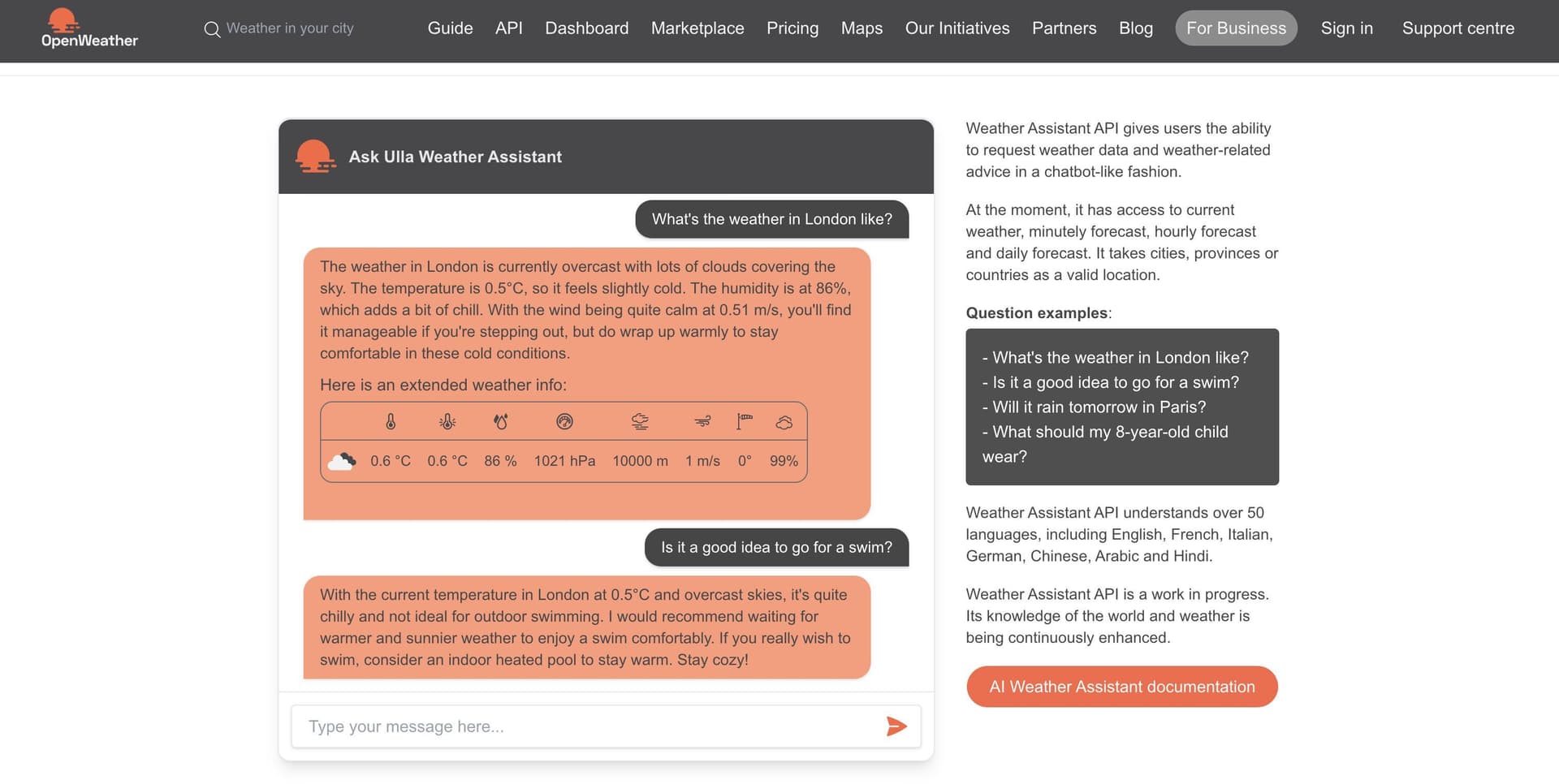
At the moment, the AI Weather Assistant considers current weather, minutely forecast, hourly forecast and daily forecast for the next 7 days for any location around the globe. The product offers global coverage and accepts cities, provinces or countries as valid locations. The AI weather assistant will remember the location you are inquiring about and use it for all future inquiries until a new location is specified.
Questions examples:
- What's the weather in London like?
- Is it a good idea to go for a swim?
- Will it rain tomorrow in Paris?
- What should my 8-year-old child wear?
- Where is it better to go on holiday next weekend: in London or Paris?
The AI Weather Assistant understands over 50 languages, including English, French, Italian, German, Chinese, Arabic and Hindi.
The AI Weather Assistant is a work in progress. Its knowledge of the world and weather is being continuously enhanced.
How to make a call with web interface
Here you will find how to explore the service in a chatbot-like format with the web interface to familiarize yourself with the service's functionality, test various use cases, and understand how the AI Weather Assistant responds to different queries before implementing it in your projects.
The address of the web page with the web interface is:
How to make a call with web interface
https://openweathermap.org/weather-assistant?apikey={API key}Ensure that you use your valid OpenWeather API key in place of api key.
Parameters | ||
|---|---|---|
| required | Your unique API key (you can always find it on your account page under the "API key" tab) |
Upon successful validation of the API key, you will be directed to the default chat page. This page serves as the primary interface for interacting with the AI Weather Assistant, allowing to initiate conversations and request weather information seamlessly.
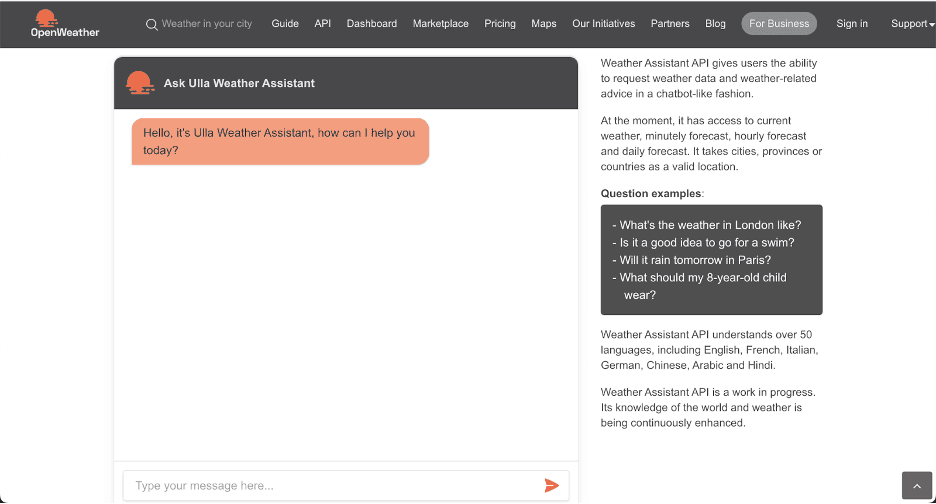
Enter your prompt to communicate with the AI Weather Assistant. The AI Weather Assistant will remember the location you are inquiring about and will use it for all future inquiries until a new location is specified. The topic can include queries about the weather or activities based on weather data.
How to make a call with API Endpoints
Step 1: Session start
This HTTP method is used to start a session and ask questions about the weather and weather related advice.To interact with the AI Weather Assistant, please enter your prompt following the guidelines outlined below.
In case of successful creation, the method returns an HTTP code 200.
Method: POST
Header: Content-Type: application/json
X-Api-Key: [your OpenWeather API key]
URL
https://api.openweathermap.org/assistant/sessionExample of the request body
        json = {
          "prompt": "What’s weather like in London?",
        }
Parameters | ||
|---|---|---|
| required | Query about the weather or activities based on weather data the user is asking for. If a location is not provided in the request, the AI Weather Assistant will ask to specify the location. |
Example of the API response
{
          "answer": "Hello! Right now in London, it's quite
          cloudy with overcast skies. The temperature is
          around 9.5°C, but it feels a little cooler at 9.2°C.
          The humidity is at 91%, so it might feel a bit damp.
          Winds are light at 1.54 m/s coming from the southwest.
          With these conditions, it's a cozy day to perhaps enjoy
          indoor activities or a calm walk with a warm jacket.
          If you're heading out, there's no rain reported
          at the moment, but it's a good idea to keep an umbrella
          handy just in case. Stay cozy and enjoy your day in London!",
          "data": {
              "London": {
                  "Current UTC Time": "15 January 2025, 14:25",
                  "Current Week Day UTC": "Wednesday",
                  "clouds": 100,
                  "dew_point": 281.26,
                  "dt": 1736951146,
                  "feels_like": 282.19,
                  "humidity": 91,
                  "pressure": 1034,
                  "sunrise": 1736927957,
                  "sunset": 1736958011,
                  "temp": 282.65,
                  "uvi": 0.43,
                  "visibility": 10000,
                  "weather": [
                      {
                          "description": "overcast clouds",
                          "icon": "04d",
                          "id": 804,
                          "main": "Clouds"
                      }
                  ],
                  "wind_deg": 240,
                  "wind_speed": 1.54
              }
          },
          "session_id": "d47d2211-f1cf-409c-8297-617d74945571"
        }
Fields in API response
answerLLM-generated answer to the promptdataData that was used as the data source for generating the 'answer' part. Please note that only sections relevant to the time period mentioned in the "prompt" are included in the API response. If the user doesn’t mention a location or continues to inquire about the same location, the 'data' field will remain empty. The “data” field will contain new weather data automatically upon receiving a query related to a different location or forecast type.loc1Location 1 name from inquirycurrent UTC TimeCurrent time, UTCcurrent Week Day UTCDay of the week, UTClatLatitude of the location, decimal (−90; 90)lonLongitude of the location, decimal (-180; 180)timezoneTimezone name for the requested locationtimezone_offsetShift in seconds from UTCcurrentCurrent weather data API responsecurrent.dtCurrent time, Unix, UTCcurrent.sunriseSunrise time, Unix, UTC. For polar areas in midnight sun and polar night periods this parameter is not returned in the responsecurrent.sunsetSunset time, Unix, UTC. For polar areas in midnight sun and polar night periods this parameter is not returned in the responsecurrent.tempTemperature, kelvincurrent.feels_likeTemperature. This temperature parameter accounts for the human perception of weather, kelvin.current.pressureAtmospheric pressure on the sea level, hPacurrent.humidityHumidity, %current.dew_pointAtmospheric temperature (varying according to pressure and humidity) below which water droplets begin to condense and dew can form. Units: kelvincurrent.cloudsCloudiness, %current.uviCurrent UV indexcurrent.visibilityAverage visibility, metres. The maximum value of the visibility is 10 kmcurrent.wind_speedWind speed. Wind speed. Units: metre/seccurrent.wind_gust(where available) Wind gust, metre/seccurrent.wind_degWind direction, degrees (meteorological)current.wind_speedWind speed. Wind speed. Units: metre/seccurrent.raincurrent.rain.1h(where available) Precipitation, mm/hcurrent.snowcurrent.snow.1h(where available)Precipitation, mm/hcurrent.weathercurrent.weather.idWeather condition idcurrent.weather.mainGroup of weather parameters (Rain, Snow etc.)current.weather.descriptionWeather condition within the group (full list of weather conditions)current.weather.iconWeather icon id. How to get iconsminutelyMinute forecast weather data API responseminutely.dtTime of the forecasted data, unix, UTCminutely.precipitationPrecipitation, mm/h.hourlyHourly forecast weather data API responsehourly.dtTime of the forecasted data, Unix, UTChourly.tempTemperature, kelvinhourly.feels_likeTemperature. This accounts for the human perception of weather, kelvinhourly.pressureAtmospheric pressure on the sea level, hPahourly.humidityHumidity, %hourly.dew_pointAtmospheric temperature (varying according to pressure and humidity) below which water droplets begin to condense and dew can form, kelvinhourly.uviUV indexhourly.cloudsCloudiness, %hourly.visibilityAverage visibility, metres. The maximum value of the visibility is 10 kmhourly.wind_speed- Wind speed, metre/sec
hourly.wind_gust(where available)Wind gust, metre/sechourly.wind_degWind direction, degrees (meteorological)hourly.popProbability of precipitation. The values of the parameter vary between 0 and 1, where 0 is equal to 0%, 1 is equal to 100%hourly.rainhourly.rain.1h(where available) Precipitation, mm/hhourly.snowhourly.snow.1h(where available)Precipitation, mm/hhourly.weathercurrent.weather.idWeather condition idcurrent.weather.mainGroup of weather parameters (Rain, Snow etc.)current.weather.descriptionWeather condition within the group (full list of weather conditions)current.weather.iconWeather icon id. How to get iconsdailyDaily forecast weather data API responsedaily.dtTime of the forecasted data, Unix, UTCdaily.sunriseSSunrise time, Unix, UTC. For polar areas in midnight sun and polar night periods this parameter is not returned in the responsedaily.sunsetSunset time, Unix, UTC. For polar areas in midnight sun and polar night periods this parameter is not returned in the responsedaily.moonriseThe time of when the moon rises for this day, Unix, UTCdaily.moonsetThe time of when the moon sets for this day, Unix, UTCdaily.moon_phaseMoon phase. 0 and 1 are 'new moon', 0.25 is 'first quarter moon', 0.5 is 'full moon' and 0.75 is 'last quarter moon'. The periods in between are called 'waxing crescent', 'waxing gibbous', 'waning gibbous', and 'waning crescent', respectively. Moon phase calculation algorithm: if the moon phase values between the start of the day and the end of the day have a round value (0, 0.25, 0.5, 0.75, 1.0), then this round value is taken, otherwise the average of moon phases for the start of the day and the end of the day is takensummaryHuman-readable description of the weather conditions for the dayDaily.tempkelvindaily.temp.mornMorning temperaturedaily.temp.dayDay temperaturedaily.temp.eveEvening temperaturedaily.temp.nightNight temperaturedaily.temp.minMin daily temperaturedaily.temp.maxMax daily temperaturedaily.feels_likeThis accounts for the human perception of weather, kelvindaily.feels_like.mornMorning temperaturedaily.feels_like.dayDay temperaturedaily.feels_like.eveEvening temperaturedaily.feels_like.nightNight temperaturedaily.pressureAtmospheric pressure on the sea level, hPadaily.humidityHumidity, %daily.dew_pointAtmospheric temperature (varying according to pressure and humidity) below which water droplets begin to condense and dew can form, kelvindaily.wind_speedWind speed, metre/secdaily.wind_gust(where available) Wind gust, metre/secdaily.wind_degWind direction, degrees (meteorological)daily.cloudsCloudiness, %daily.uviThe maximum value of UV index for the daydaily.popProbability of precipitation. The values of the parameter vary between 0 and 1, where 0 is equal to 0%, 1 is equal to 100%daily.rain(where available)Precipitation volume, mmdaily.snow(where available)Snow volume, mmdaily.weatherdaily.weather.idWeather condition iddaily.weather.mainGroup of weather parameters (Rain, Snow etc.)daily.weather.descriptionWeather condition within the group (full list of weather conditions)daily.weather.iconWeather icon id. How to get iconsalertsNational weather alerts data from major national weather warning systemsalerts.sender_nameName of the alert source. Please read here the full list of alert sourcesalerts.eventAlert event namealerts.startDate and time of the start of the alert, Unix, UTCalerts.endDate and time of the end of the alert, Unix, UTCalerts.descriptionDescription of the alertalerts.tagsType of severe weathersession_idid of a conversation session
To continue the session, please see Step 2. If you want the chatbot to disregard previous messages, return to Step 1 and begin a new session.
Step 2: Resume a session
This HTTP method is used to resume a conversation session with the chatbot. The AI Weather Assistant will remember the previous messages and retain the location you specify. It will use the location for all following inquiries until a new location is provided.
In case of successful creation, the method returns an HTTP code 200.
Method: POST
Header: Content-Type: application/json
X-Api-Key: [your OpenWeather API key]
URL
https://api.openweathermap.org/assistant/session/{session_id}Example of the request body
          json = {
            "prompt": "Do I need a hat?",
          }
Parameters | ||
|---|---|---|
| required | Query about the weather or activities based on weather data the user is asking for. If a location is not provided in the initial request, the AI Weather Assistant will ask to specify the location. |
Example of the API response
        {'answer': "Given the mild temperature of around 9.76°C
        in London and the gentle north wind at 2.68 m/s,
        wearing a hat could be a good idea, especially if you
        tend to feel a bit chilly or if you're
        sensitive to cooler weather.
        Plus, a hat can add a nice style touch to your outfit!
        Stay cozy and enjoy your day, whatever you choose! 😊",
        'data': {},
        'session_id': 'xxxxxxxxx'}
Fields in API response
answerLLM-generated answer to the promptdataData that was used as the data source for generating the 'answer' part. Please note that only sections relevant to the time period mentioned in the "prompt" are included in the API response. If the user doesn’t mention a location or continues to inquire about the same location, the 'data' field will remain empty. The “data” field will contain new weather data automatically upon receiving a query related to a different location or forecast type.loc1Location 1 name from inquirycurrent UTC TimeCurrent time, UTCcurrent Week Day UTCDay of the week, UTClatLatitude of the location, decimal (−90; 90)lonLongitude of the location, decimal (-180; 180)timezoneTimezone name for the requested locationtimezone_offsetShift in seconds from UTCcurrentCurrent weather data API responsecurrent.dtCurrent time, Unix, UTCcurrent.sunriseSunrise time, Unix, UTC. For polar areas in midnight sun and polar night periods this parameter is not returned in the responsecurrent.sunsetSunset time, Unix, UTC. For polar areas in midnight sun and polar night periods this parameter is not returned in the responsecurrent.tempTemperature, kelvincurrent.feels_likeTemperature. This temperature parameter accounts for the human perception of weather, kelvin.current.pressureAtmospheric pressure on the sea level, hPacurrent.humidityHumidity, %current.dew_pointAtmospheric temperature (varying according to pressure and humidity) below which water droplets begin to condense and dew can form. Units: kelvincurrent.cloudsCloudiness, %current.uviCurrent UV indexcurrent.visibilityAverage visibility, metres. The maximum value of the visibility is 10 kmcurrent.wind_speedWind speed. Wind speed. Units: metre/seccurrent.wind_gust(where available) Wind gust, metre/seccurrent.wind_degWind direction, degrees (meteorological)current.wind_speedWind speed. Wind speed. Units: metre/seccurrent.raincurrent.rain.1h(where available) Precipitation, mm/hcurrent.snowcurrent.snow.1h(where available)Precipitation, mm/hcurrent.weathercurrent.weather.idWeather condition idcurrent.weather.mainGroup of weather parameters (Rain, Snow etc.)current.weather.descriptionWeather condition within the group (full list of weather conditions)current.weather.iconWeather icon id. How to get iconsminutelyMinute forecast weather data API responseminutely.dtTime of the forecasted data, unix, UTCminutely.precipitationPrecipitation, mm/h.hourlyHourly forecast weather data API responsehourly.dtTime of the forecasted data, Unix, UTChourly.tempTemperature, kelvinhourly.feels_likeTemperature. This accounts for the human perception of weather, kelvinhourly.pressureAtmospheric pressure on the sea level, hPahourly.humidityHumidity, %hourly.dew_pointAtmospheric temperature (varying according to pressure and humidity) below which water droplets begin to condense and dew can form, kelvinhourly.uviUV indexhourly.cloudsCloudiness, %hourly.visibilityAverage visibility, metres. The maximum value of the visibility is 10 kmhourly.wind_speed- Wind speed, metre/sec
hourly.wind_gust(where available)Wind gust, metre/sechourly.wind_degWind direction, degrees (meteorological)hourly.popProbability of precipitation. The values of the parameter vary between 0 and 1, where 0 is equal to 0%, 1 is equal to 100%hourly.rainhourly.rain.1h(where available) Precipitation, mm/hhourly.snowhourly.snow.1h(where available)Precipitation, mm/hhourly.weathercurrent.weather.idWeather condition idcurrent.weather.mainGroup of weather parameters (Rain, Snow etc.)current.weather.descriptionWeather condition within the group (full list of weather conditions)current.weather.iconWeather icon id. How to get iconsdailyDaily forecast weather data API responsedaily.dtTime of the forecasted data, Unix, UTCdaily.sunriseSSunrise time, Unix, UTC. For polar areas in midnight sun and polar night periods this parameter is not returned in the responsedaily.sunsetSunset time, Unix, UTC. For polar areas in midnight sun and polar night periods this parameter is not returned in the responsedaily.moonriseThe time of when the moon rises for this day, Unix, UTCdaily.moonsetThe time of when the moon sets for this day, Unix, UTCdaily.moon_phaseMoon phase. 0 and 1 are 'new moon', 0.25 is 'first quarter moon', 0.5 is 'full moon' and 0.75 is 'last quarter moon'. The periods in between are called 'waxing crescent', 'waxing gibbous', 'waning gibbous', and 'waning crescent', respectively. Moon phase calculation algorithm: if the moon phase values between the start of the day and the end of the day have a round value (0, 0.25, 0.5, 0.75, 1.0), then this round value is taken, otherwise the average of moon phases for the start of the day and the end of the day is takensummaryHuman-readable description of the weather conditions for the dayDaily.tempkelvindaily.temp.mornMorning temperaturedaily.temp.dayDay temperaturedaily.temp.eveEvening temperaturedaily.temp.nightNight temperaturedaily.temp.minMin daily temperaturedaily.temp.maxMax daily temperaturedaily.feels_likeThis accounts for the human perception of weather, kelvindaily.feels_like.mornMorning temperaturedaily.feels_like.dayDay temperaturedaily.feels_like.eveEvening temperaturedaily.feels_like.nightNight temperaturedaily.pressureAtmospheric pressure on the sea level, hPadaily.humidityHumidity, %daily.dew_pointAtmospheric temperature (varying according to pressure and humidity) below which water droplets begin to condense and dew can form, kelvindaily.wind_speedWind speed, metre/secdaily.wind_gust(where available) Wind gust, metre/secdaily.wind_degWind direction, degrees (meteorological)daily.cloudsCloudiness, %daily.uviThe maximum value of UV index for the daydaily.popProbability of precipitation. The values of the parameter vary between 0 and 1, where 0 is equal to 0%, 1 is equal to 100%daily.rain(where available)Precipitation volume, mmdaily.snow(where available)Snow volume, mmdaily.weatherdaily.weather.idWeather condition iddaily.weather.mainGroup of weather parameters (Rain, Snow etc.)daily.weather.descriptionWeather condition within the group (full list of weather conditions)daily.weather.iconWeather icon id. How to get iconsalertsNational weather alerts data from major national weather warning systemsalerts.sender_nameName of the alert source. Please read here the full list of alert sourcesalerts.eventAlert event namealerts.startDate and time of the start of the alert, Unix, UTCalerts.endDate and time of the end of the alert, Unix, UTCalerts.descriptionDescription of the alertalerts.tagsType of severe weathersession_idid of a conversation session
Other features
List of weather condition codes
List of weather condition codes with icons (range of thunderstorm, drizzle, rain, snow, clouds, atmosphere etc.)
Units of measurement
standard, metric and imperial units are available.
API call
https://api.openweathermap.org/data/3.0/onecall?lat={lat}&lon={lon}&units={units}Parameters | ||
|---|---|---|
| optional | Units of measurement. |
Temperature is available in Fahrenheit, Celsius and Kelvin units.
Wind speed is available in miles/hour and meter/sec.
- For temperature in Fahrenheit and wind speed in miles/hour, use
units=imperial - For temperature in Celsius and wind speed in meter/sec, use
units=metric - Temperature in Kelvin and wind speed in meter/sec is used by default, so there is no need to use the units parameter in the API call if you want this
Examples of API calls
Standard (default)
api.openweathermap.org/data/3.0/onecall?lat=30.489772&lon=-99.771335Metric
api.openweathermap.org/data/3.0/onecall?lat=30.489772&lon=-99.771335&units=metricImperial
api.openweathermap.org/data/3.0/onecall?lat=30.489772&lon=-99.771335&units=imperialMultilingual support
You can use lang parameter to get the output in your language.
The contents of the description field will be translated.
API call
https://api.openweathermap.org/data/3.0/onecall?lat={lat}&lon={lon}&lang={lang}Parameters | ||
|---|---|---|
| optional | You can use the |
Example of API call
Before making an API call, please note that the One Call API, endpoint version 3.0, is included in the "One Call API" subscription only. Learn more
https://api.openweathermap.org/data/3.0/onecall?lat=30.489772&lon=-99.771335&lang=zh_cnWe support the following languages. To select one, you can use the corresponding language code:
sqAlbanianafAfrikaansarArabicazAzerbaijanieuBasquebeBelarusianbgBulgariancaCatalanzh_cnChinese Simplifiedzh_twChinese TraditionalhrCroatianczCzechdaDanishnlDutchenEnglishfiFinnishfrFrenchglGaliciandeGermanelGreekheHebrewhiHindihuHungarianisIcelandicidIndonesianitItalianjaJapanesekrKoreankuKurmanji (Kurdish)laLatvianltLithuanianmkMacedoniannoNorwegianfaPersian (Farsi)plPolishptPortuguesept_brPortuguês BrasilroRomanianruRussiansrSerbianskSlovakslSloveniansp, esSpanishsv, seSwedishthThaitrTurkishua, ukUkrainianviVietnamesezuZulu
List of national weather alerts sources
Country | Agency |
Albania | Institute of GeoSciences, Energy, Water and Environment of Albania |
Algeria | National Meteorological Office |
Argentina | National Weather Service of Argentina |
Australia | Australian Bureau of Meteorology |
Austria | |
Bahrain | Bahrain Meteorological Directorate |
Barbados | Barbados Meteorological Service |
Belarus | State institution "Republican center for hydrometeorology, control of radioactive contamination and environmental monitoring" (Belhydromet) |
Belgium | Royal Meteorological Institute |
Belize | National Meteorological Service of Belize |
Benin | National Meteorological Agency (METEO-BENIN) |
Bosnia and Herzegovina | |
Botswana | Botswana Meteorological Services |
Brazil | National Meteorological Institute - INMET |
Bulgaria | National Institute of Meteorology and Hydrology - Plovdiv branch |
Cameroon | Cameroon National Meteorological Service |
Canada | |
Chile | Meteorological Directorate of Chile |
Congo | National Civil Aviation Agency (ANAC Congo) |
Costa Rica | National Meteorological Institute of Costa Rica |
Croatia | State Hydrometeorological Institute (DHMZ) |
Curacao and Sint Maarten | Meteorological Department Curacao |
Cyprus | Republic of Cyprus - Department of Meteorology |
Czech Republic | Czech Hydrometeorological Institute |
Denmark | Danish Meteorological Institute |
Ecuador | Ecuadoran Institute for Meteorology and Hydrology (INAMHI) |
Egypt | Egyptian Meteorological Authority |
Estonia | Estonian Environment Agency |
Eswatini | Eswatini Meteorological Service |
Finland | Finnish Meteorological Institute |
France | Meteo-France |
Gabon | General Directorate of Meteorology of Gabon |
Germany | German Meteorological Office |
Ghana | Ghana Meteorological Agency |
Greece | Hellenic National Meteorological Service |
Guinea | National Meteorological Agency of Guinea |
Guyana | Hydrometeorological Service of Guyana |
Hong Kong China | Hong Kong Observatory |
Hungary | Hungarian Meteorological Service |
Iceland | Icelandic Meteorological Office |
India | India Meteorological Department |
Indonesia | |
Ireland | Met Eireann - Irish Meteorological Service |
Israel | Israel Meteorological Service |
Italy | Italian Air Force National Meteorological Service |
Ivory Coast | Airport, aeronautical and meteorological operating and development company (SODEXAM) |
Jamaica | Meteorological Service of Jamaica |
Japan | Japan Meteorological Business Support Center |
Jordan | Jordanian Meteorological Department |
Kazakhstan | National Hydrometeorological Service of the Republic of Kazakhstan (Kazhydromet) |
Kenya | Kenya Meteorological Department |
Kuwait | Kuwait Meteorological Department |
Latvia | Latvian Environment, Geology and Meteorology Center |
Lesotho | Lesotho Meteorological Services |
Libya | Libyan National Meteorological Center |
Lithuania | Lithuanian Hydrometeorological Service under the Ministry of Environment of the Republic of Lithuania (LHMS) |
Luxembourg | Luxembourg Airport Administration |
Macao China | Macao Meteorological and Geophysical Bureau |
Madagascar | METEO Madagascar |
Malawi | Malawi Department of Climate Change and Meteorological Services |
Maldives | Maldives Meteorological Service |
Mauritania | National Meteorological Office of Mauritania |
Mauritius | Mauritius Meteorological Services |
Mexico | CONAGUA - National Meteorological Service of Mexico |
Moldova | State Hydrometeorological Service of Moldova |
Mongolia | National Agency Meteorology and the Environmental Monitoring of Mongolia |
Mozambique | National Institute of Meteorology of Mozambique |
Myanmar | Myanmar Department of Meteorology and Hydrology |
Netherlands | Royal Netherlands Meteorological Institute (KNMI) |
New Zealand | |
New Zealand | New Zealand Emergency Mobile Alert |
Niger | National Meteorological Directorate of Niger |
Nigeria | Nigerian Meteorological Agency (NiMet) |
North Macedonia | National Hydrometeorological Service - Republic of Macedonia |
Norway | |
Paraguay | Directorate of Meteorology and Hydrology |
Philippines | Philippine Atmospheric Geophysical and Astronomical Services Administration |
Poland | Institute of Meteorology and Water Management (IMGW-PIB) |
Portugal | Portuguese Institute of Sea and Atmosphere, I.P. |
Qatar | Qatar Meteorology Department |
Republic of Korea | Korea Meteorological Administration, Weather Information |
Romania | National Meteorological Administration |
Russia | Hydrometcenter of Russia |
Saudi Arabia | National Center for Meteorology - Kingdom of Saudi Arabia |
Serbia | Republic Hydrometeorological Service of Serbia |
Seychelles | Seychelles Meteorological Authority |
Singapore | Meteorological Service Singapore |
Slovakia | Slovak Hydrometeorological Institute |
Slovenia | National Meteorological Service of Slovenia |
Solomon Islands | Solomon Islands Meteorological Services |
South Africa | South African Weather Service (SAWS) |
Spain | State Meteorological Agency (AEMET) |
Sudan | Sudan Meteorological Authority |
Sweden | Swedish Meteorological and Hydrological Institute |
Switzerland | MeteoSwiss |
Tanzania | Tanzania Meteorological Authority |
Thailand | Thai Meteorological Department |
Timor-Leste | National Directorate of Meteorology and Geophysics of Timor-Leste |
Trinidad and Tobago | Trinidad and Tobago Meteorological Service |
Ukraine | Ukrainian Hydrometeorological Center |
United Arab Emirates (UAE) | National Center of Meteorology (NCM), United Arab Emirates |
United Kingdom of Great Britain and Northern Ireland | UK Met Office |
Uruguay | Uruguayan Institute of Meteorology |
USA | |
Uzbekistan | Uzhydromet |
Yemen | Yemeni Civil Aviation and Meteorology Authority (CAMA) |
Zambia | Meteorological Department Zambia |
Zimbabwe | Meteorological Services Department |
Please note that some agencies from the list may cease to provide us the weather alert information. In case you don’t receive alerts from any agency, please contact us. We constantly work on our product’s improvement and keep expanding the list of partner agencies.
Call back function for JavaScript code
To use JavaScript code you can transfer callback functionName to JSONP callback.
API call example
test({
  "lat": 40.12,
  "lon": -96.66,
  "timezone": "America/Chicago",
  "timezone_offset": -18000,
  "current": {
    "dt": 1595243443,
    "sunrise": 1595243663,
    "sunset": 1595296278,
    "temp": 293.28,
    "feels_like": 293.82,
    "pressure": 1016,
    "humidity": 100,
    "dew_point": 293.28,
    "uvi": 10.64,
    "clouds": 90,
    "visibility": 10000,
    "wind_speed": 4.6,
    "wind_deg": 310,
    "weather": [
      {
        "id": 501,
        "main": "Rain",
        "description": "moderate rain",
        "icon": "10n"
      },
      {
        "id": 201,
        "main": "Thunderstorm",
        "description": "thunderstorm with rain",
        "icon": "11n"
      }
    ],
    "rain": {
      "1h": 2.93
    }
  },
  "minutely": [
    {
      "dt": 1595243460,
      "precipitation": 2.928
    },
    ...
  },
    "hourly": [
    {
      "dt": 1595242800,
      "temp": 293.28,
      "feels_like": 293.82,
      "pressure": 1016,
      "humidity": 100,
      "dew_point": 293.28,
      "clouds": 90,
      "visibility": 10000,
      "wind_speed": 4.6,
      "wind_deg": 123,
      "weather": [
        {
          "id": 501,
          "main": "Rain",
          "description": "moderate rain",
          "icon": "10n"
        }
      ],
      "pop": 0.99,
      "rain": {
        "1h": 2.46
      }
    },
    ...
  }
"daily": [
    {
      "dt": 1595268000,
      "sunrise": 1595243663,
      "sunset": 1595296278,
      "temp": {
        "day": 298.82,
        "min": 293.25,
        "max": 301.9,
        "night": 293.25,
        "eve": 299.72,
        "morn": 293.48
      },
      "feels_like": {
        "day": 300.06,
        "night": 292.46,
        "eve": 300.87,
        "morn": 293.75
      },
      "pressure": 1014,
      "humidity": 82,
      "dew_point": 295.52,
      "wind_speed": 5.22,
      "wind_deg": 146,
      "weather": [
        {
          "id": 502,
          "main": "Rain",
          "description": "heavy intensity rain",
          "icon": "10d"
        }
      ],
      "clouds": 97,
      "pop": 1,
      "rain": 12.57,
      "uvi": 10.64
    },
    ...
    },
"alerts": [
    {
      "sender_name": "NWS Tulsa (Eastern Oklahoma)",
      "event": "Heat Advisory",
      "start": 1597341600,
      "end": 1597366800,
      "description": "...HEAT ADVISORY REMAINS IN EFFECT FROM 1 PM THIS AFTERNOON TO\n8 PM CDT THIS EVENING...\n* WHAT...Heat index values of 105 to 109 degrees expected.\n* WHERE...Creek, Okfuskee, Okmulgee, McIntosh, Pittsburg,\nLatimer, Pushmataha, and Choctaw Counties.\n* WHEN...From 1 PM to 8 PM CDT Thursday.\n* IMPACTS...The combination of hot temperatures and high\nhumidity will combine to create a dangerous situation in which\nheat illnesses are possible."
    },
    ...
  ]
  })
API errors
Structure of API errors
In case of incorrected API call you will receive API error response. Error response payload returned for all types of errors with the structure below.
Example of error response
{
    "cod":400,
    "message":"Invalid date format",
    "parameters": [
        "date"
    ]
}
Fields in error response
codCode of errormessageDescription of errorparameters(optional) List of request parameters names that are related to this particular error
Errors list
Please find more detailed information about some popular errors below.
API calls return an error 400

API calls return an error 401
API calls return an error 404
API calls return an error 429
API calls return errors '5xx'
